---
title: Custom CSS
description: CSS (Cascading Style Sheets) is a computer language used to adjust an HTML document and allows you to change many elements of your design. Discover it now👉
---
[Skip to content](https://help.pointerpro.com/custom-css#main-content)
[](https://pointerpro.com/)
- [Pricing](https://pointerpro.com/pricing)
- [Customer stories](https://pointerpro.com/case-studies)
Open main navigation
Close main navigation
- [Pricing](https://pointerpro.com/pricing)
- [Customer stories](https://pointerpro.com/case-studies)
- [New here? Explore what Pointerpro can do](https://www.pointerpro.com/)
[New here? Explore what Pointerpro can do](https://www.pointerpro.com/)
How can we help you?
- There are no suggestions because the search field is empty.
1. [Knowledge Base](https://help.pointerpro.com/?hsLang=en)
2. [Build & Design](https://help.pointerpro.com/build-design?hsLang=en)
3. [Design your survey](https://help.pointerpro.com/build-design?hsLang=en#design-your-survey)
# Custom CSS
## CSS (Cascading Style Sheets) is a computer language used to adjust the presentation of a HTML or XML document. Adding Custom CSS allows you to change many elements of your design (e.g., make answers larger, make buttons out of links, etc.) that are not included in the Design tab.
##### You'll need this:
- One of these Pointerpro plans:
 Professional  Enterprise  ReportR  DistributR
---
NOTE
Advantages of using custom CSS
- It helps **brand recall** as it allows you to recreate your company's branding entirely to make the survey match and will therefore enable customers to immediately link the survey with your company.
- Greater **flexibility to tweak the design** – check out the examples below to see how many things you can change using CSS. If there are a few things bothering you about the way the survey appears, CSS enables you to tailor the survey design in all details.
##### On this help guide page:
1. [Add a custom CSS file](https://help.pointerpro.com/custom-css#add-custom-css)
2. [Notes about CSS](https://help.pointerpro.com/custom-css#notes)
3. [Examples of CSS](https://help.pointerpro.com/custom-css#examples)
---
[](https://pointerpro.com/features/pdf-report-builder?cf1=helpguidepage)1. Add custom CSS file
Make a CSS or Text-file with the changes you want, and upload it by clicking **Add custom CSS file** which you'll find in the **Design** tab of your questionnaire.

#### 2. Notes about CSS
Here are some notes to remember when writing a CSS file:
- Always start with the right element, and always open and close your CSS with brackets.
```
body {...}
```
- Always put a semicolon (;) after a CSS code.
- You can find the right elements (HTML) by opening a web inspector in your web browser.
- You can give an element different CSS codes, i.e., editing font, color, and style of a text.
```
p { font-family: ‘arial’; color: ‘blue’; font-style: ‘italic’; }
```
- Font size often use ‘em’ while other CSS mostly use pixels (px) or percent (%)
```
font-size: 0.8em; width: 60px; or 15%;
```
- In HTML, when an element is named with a class, you start your CSS element with a point.
```
.input {...}
```
- In HTML, when an element is named with an ID, you start your CSS element with a hashtag.
```
#content2 {...}
```
- Need help with fonts? [Click here](https://www.w3schools.com/cssref/css_websafe_fonts.asp).
- Need help with colors? [Click here](http://colours.neilorangepeel.com/).
#### 3. Examples of CSS
Here are examples to illustrate how CSS changes the format of different elements. Use this list to jump to the example that you're looking for:
- [Make answer text larger](https://help.pointerpro.com/custom-css#answer-larger)
- [Make button text larger](https://help.pointerpro.com/custom-css#button-larger)
- [Resize images](https://help.pointerpro.com/custom-css#resize-images)
- [Resize videos](https://help.pointerpro.com/custom-css#resize-videos)
- [Resize logo](https://help.pointerpro.com/custom-css#resize-logo)
- [Resize outcome image](https://help.pointerpro.com/custom-css#resize-outcome)
- [Define font sizes](https://help.pointerpro.com/custom-css#define-font-sizes)
- [Define font](https://help.pointerpro.com/custom-css#define-font)
- [Remove line between questions on the same slide](https://help.pointerpro.com/custom-css#remove-line)
- [Adjust space under the question](https://help.pointerpro.com/custom-css#adjust-space)
- [Color the border around answers](https://help.pointerpro.com/custom-css#color-border)
- [Change text color and background of the selected answer](https://help.pointerpro.com/custom-css#chnage-text-color)
- [Change the color of the slider](https://help.pointerpro.com/custom-css#change-color-slider)
- [Change the color of the star/smiley rating](https://help.pointerpro.com/custom-css#change-color-rating)
- [Change the color of the border around the quiz score hand indicator](https://help.pointerpro.com/custom-css#change-color-border)
### Make answer text larger
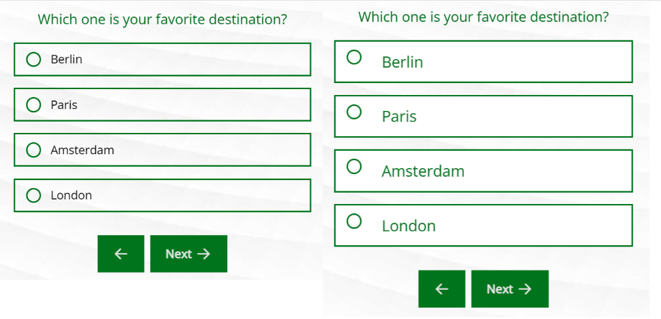
```
.answer-content {font-size:130%;}
```
### Make button text larger
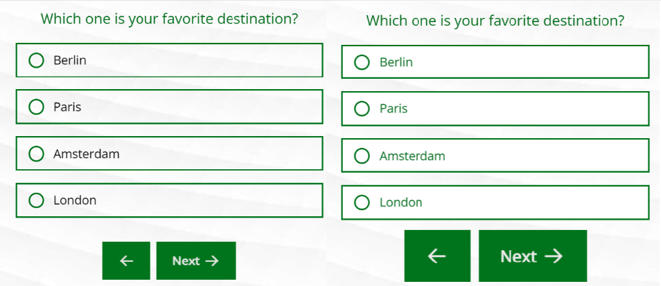
```
.button { font-size:180%;}
```
### Resize Images
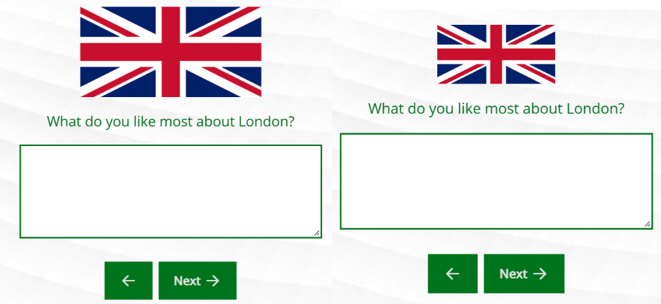
```
#question-1 .imagequestion {width:65%; max height: none;}
```
### Resize videos
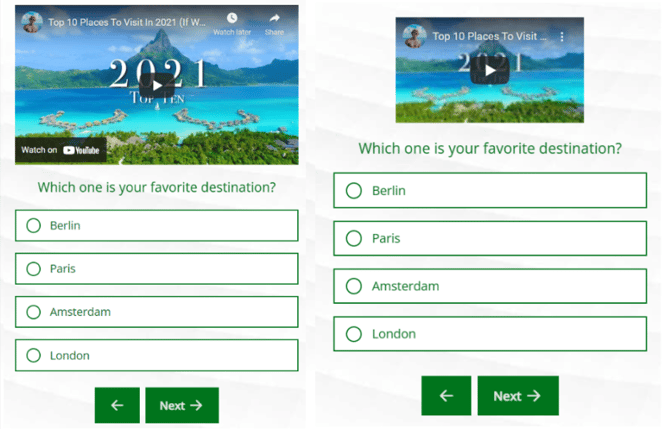
```
#question-1 .media-container { width:60%; max-height: none; margin: 0 auto; }
```
### Resize logo
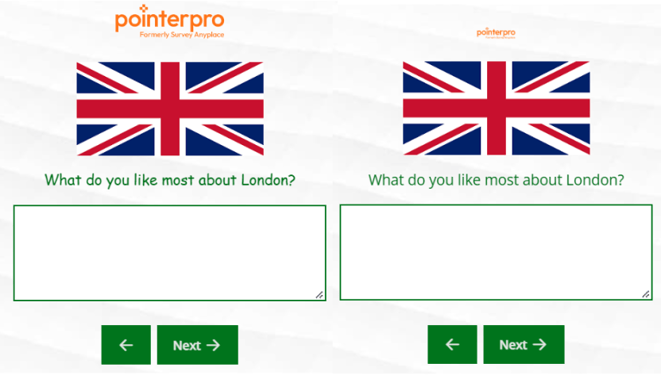
```
.card-logo img { width: 35%; max-height: none; }
```
### Resize outcome image
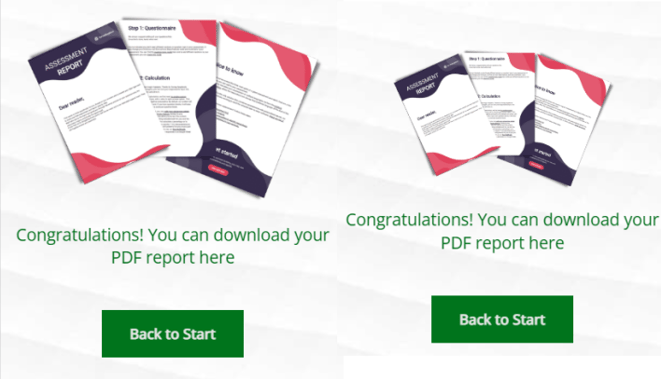
```
.slide-type-final .media-container img{width: 75%; max-height: none; margin: 0 auto; 0
```
#### Define font sizes
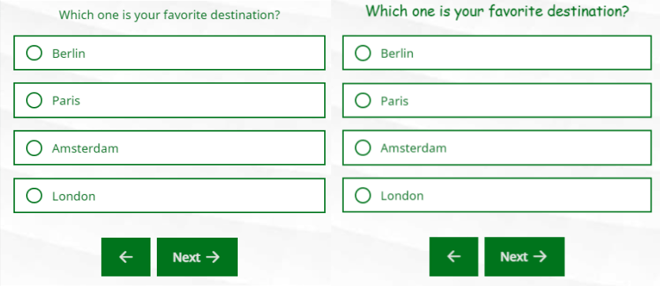
```
.theme-font-size-xsmall {font-size: 0.6em;}.theme-font-size-small {font-size: 1.3em;}.theme-font-size-large {font-size: 1.8em;}.theme-font-size-xlarge {font-size: 4.5em;}
```
### Define font
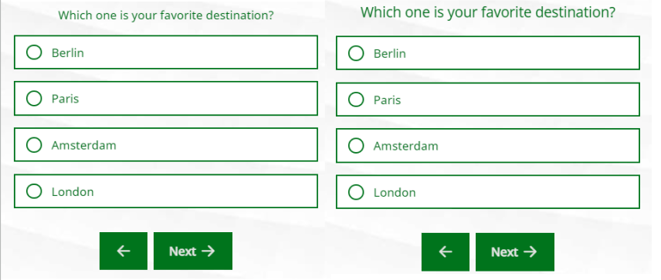
```
p {font-family: "Comic Sans MS";}
```
### Remove line between questions on the same slide
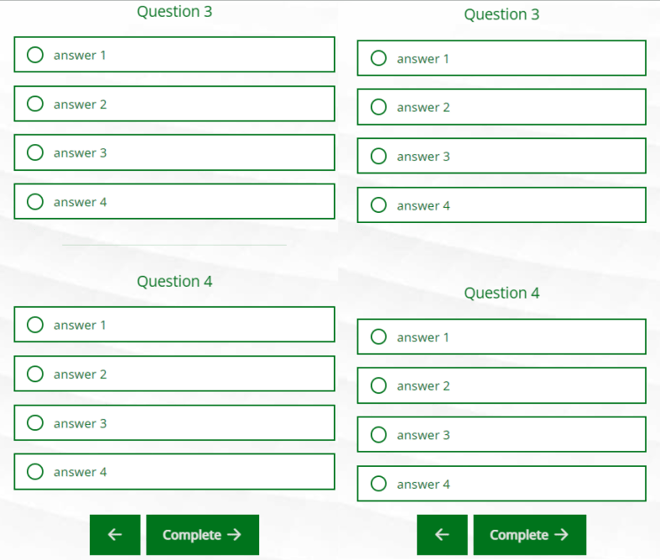
```
hr {display:none;}.card-content-item {padding:5%;}
```
### Adjust space under the question
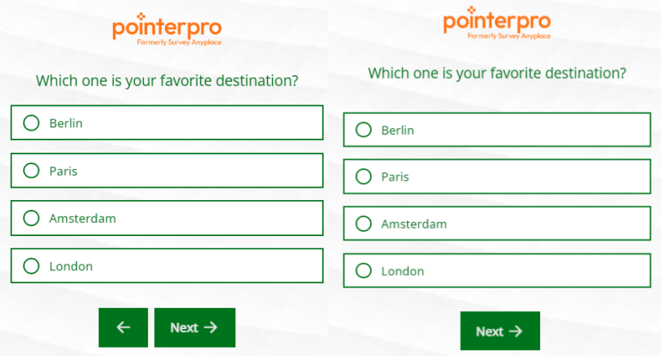
```
body.design-version-3 .text-container, body.theme-template-light.text-container, body.theme-template-dark .text-container{margin-bottom: 50px;}
```
### Color the border around answers
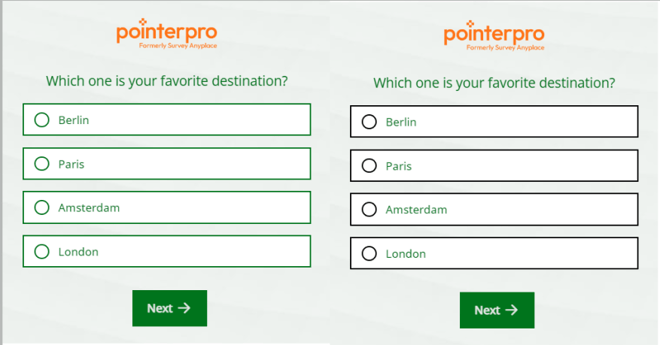
```
.answer-content, .checkbox, .input, .radio, .select, .ui-state-default .answer-content, .ui-state-disabled .answer-content {border-color: black;}
```
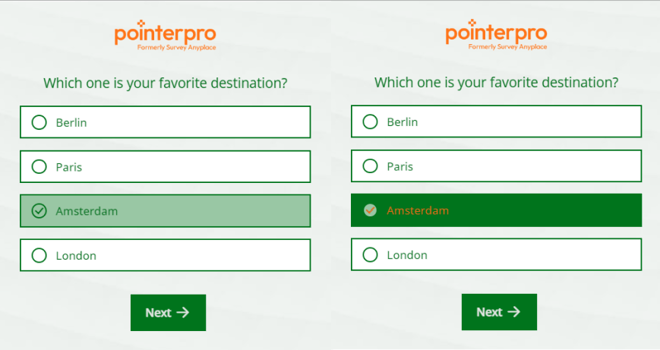
### Change text color and background of the selected answer
```
.form .checkbox:checked+.answer-content, .ranked.column-multi .column-sortable-2 .answer-content, .ranked.column-single-click .checkbox:checked+.answer-content, .text-choice .checkbox:checked+.answer-content, .text-choice .radio:checked+.answer-content {background-color: #00741c;color: #ff7418;}
```
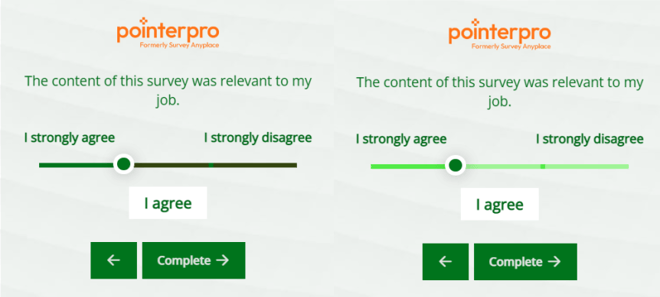
### Change the color of the slider
```
.rangeslider:after, .rangeslider__fill ,.rangeslider-markers .marker {background-color: #51eb46;}#js-rangeslider-0.rangeslider.rsNoDrag.rangeslider--horizontal{ background-color: #b3f6aa;}
```
### Change the color of the star/smiley rating

```
.star-rating-widget,.smiley-rating-widget{color: #51eb46;}
```
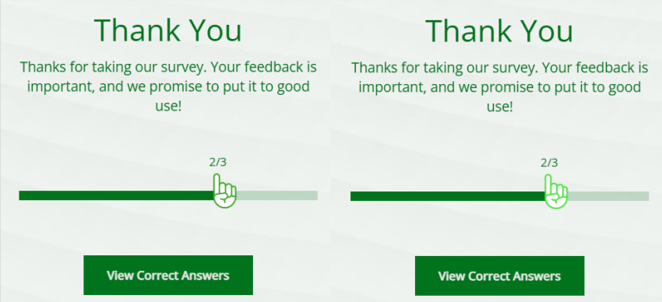
### Change the color of the border around the quiz score hand indicator
```
.gauge-assessment.opened .active .title,.gauge .hand,.gauge-assessment .hand {color: #51eb46;}
```
Pointerpro is not only available for desktop or laptop, it’s also available on many other platforms and devices! Because of this, layouts with custom CSS can differ on other screens.
To make the survey adjustable to multiple screens, it is advised to use @media-query.
#### What's next?
- Add a [Custom Button with HTML](https://help.pointerpro.com/migration/knowledge/create-a-custom-button-with-html?hsLang=en): Create a Custom Button with HTML and add it into an outcome or the final page of your questionnaire, in order to embed a hidden hyperlink and redirect your respondents to the webpage of your choice.
- [PDF design settings using CSS](https://help.pointerpro.com/migration/knowledge/previous-report-builder-pdf-design-settings-using-css?hsLang=en): CSS allows you to change other elements of your design (e.g., make answers larger, make buttons out of links, etc.) that are not included in the Design tab. You can make use of the HTML view to preview your changes.
- The [text editor](https://help.pointerpro.com/migration/knowledge/text-editor-wysiwyg?hsLang=en) allows you to make your text more interesting by changing the font, color, size, adding emoticons and variables to personalize questions. It also allows you adjust your content with HTML. What you adjust in the survey tool is what you will see in the survey itself.
- [Getting Started](https://help.pointerpro.com/getting-started?hsLang=en#main-content)
- [Getting Started](https://help.pointerpro.com/getting-started?hsLang=en#getting-started)
- [How To Guides](https://help.pointerpro.com/getting-started?hsLang=en#how-to-guides)
- [Glossary](https://help.pointerpro.com/getting-started?hsLang=en#glossary)
- [Build & Design](https://help.pointerpro.com/build-design?hsLang=en#main-content)
- [Intro Screen & Final Screen](https://help.pointerpro.com/build-design?hsLang=en#intro-screen-final-screen)
- [Question Types](https://help.pointerpro.com/build-design?hsLang=en#question-types)
- [Media & Variables](https://help.pointerpro.com/build-design?hsLang=en#media-variables)
- [Design your survey](https://help.pointerpro.com/build-design?hsLang=en#design-your-survey)
- [Campaigns](https://help.pointerpro.com/build-design?hsLang=en#campaigns)
- [FAQ](https://help.pointerpro.com/build-design?hsLang=en#faq)
- [Extra Options](https://help.pointerpro.com/extra-options?hsLang=en#main-content)
- [Text options](https://help.pointerpro.com/extra-options?hsLang=en#text-options)
- [Question logic](https://help.pointerpro.com/extra-options?hsLang=en#question-logic)
- [Custom scoring](https://help.pointerpro.com/extra-options?hsLang=en#custom-scoring)
- [Quiz Options](https://help.pointerpro.com/extra-options?hsLang=en#quiz-options)
- [Kiosk mode options](https://help.pointerpro.com/extra-options?hsLang=en#kiosk-mode-options)
- [Data collection options](https://help.pointerpro.com/extra-options?hsLang=en#data-collection-options)
- [Other options](https://help.pointerpro.com/extra-options?hsLang=en#other-options)
- [Integrations & API](https://help.pointerpro.com/extra-options?hsLang=en#integrations-api)
- [FAQ](https://help.pointerpro.com/extra-options?hsLang=en#faq)
- [Share & Results](https://help.pointerpro.com/share-results?hsLang=en#main-content)
- [Sharing your questionnaire](https://help.pointerpro.com/share-results?hsLang=en#sharing-your-questionnaire)
- [View Results](https://help.pointerpro.com/share-results?hsLang=en#view-results)
- [Results Dashboard](https://help.pointerpro.com/share-results?hsLang=en#results-dashboard)
- [Uploading and Downloading Results](https://help.pointerpro.com/share-results?hsLang=en#uploading-and-downloading-results)
- [FAQ](https://help.pointerpro.com/share-results?hsLang=en#faq)
- [Report Builder](https://help.pointerpro.com/report-builder?hsLang=en#main-content)
- [General](https://help.pointerpro.com/report-builder?hsLang=en#general)
- [Widgets](https://help.pointerpro.com/report-builder?hsLang=en#widgets)
- [Aggregate Reports](https://help.pointerpro.com/report-builder?hsLang=en#aggregate-reports)
- [FAQ](https://help.pointerpro.com/report-builder?hsLang=en#faq)
- [Legacy Report Builder \[deprecated\]](https://help.pointerpro.com/report-builder?hsLang=en#legacy-report-builder-deprecated)
- [Dashboard Builder](https://help.pointerpro.com/dashboard-builder?hsLang=en#main-content)
- [General](https://help.pointerpro.com/dashboard-builder?hsLang=en#general)
- [Widgets items](https://help.pointerpro.com/dashboard-builder?hsLang=en#widgets-items)
- [Distribution Portal](https://help.pointerpro.com/distribution-portal?hsLang=en#main-content)
- [Configuration](https://help.pointerpro.com/distribution-portal?hsLang=en#configuration)
- [Management & Administration](https://help.pointerpro.com/management-administration?hsLang=en#main-content)
- [Account & Billing](https://help.pointerpro.com/management-administration?hsLang=en#account-billing)
- [GDPR compliance](https://help.pointerpro.com/management-administration?hsLang=en#gdpr-compliance)
- [FAQ](https://help.pointerpro.com/management-administration?hsLang=en#faq)
[](http://pointerpro.com)
Can't find what you're looking for? Contact us at [support@pointerpro.com](mailto:support@pointerpro.com)
Copyright © 2026, Pointerpro