
You'll need this:
-
One of these Pointerpro plans:
 Professional Enterprise ReportR DistributR
On this help guide page:
1. How to change your email address
Please contact support@pointerpro.com and mention the email address you currently use and which email address you would like your profile to change to. Our support team will change your email address as soon as possible.
2. How to change your password
2.1 Forgot your password?
If you have forgotten your password, click on the “Forgot your password?” link on the login page. Enter your email address to receive reset password instructions.
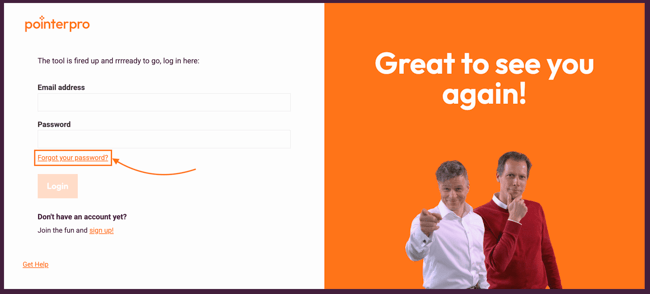
An e-mail will be sent to you with further instructions. It may take a few minutes to receive the email. Make sure to check your Spam folder in case the password reset email ended up there.
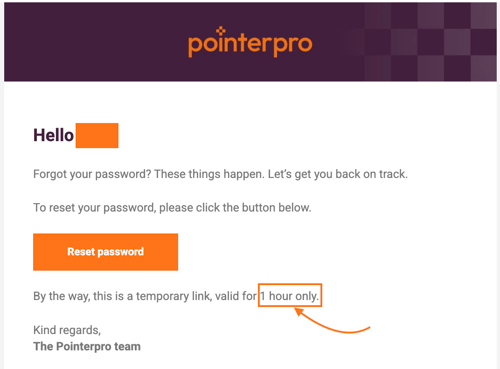
NOTE
The reset password link is a temporary link and only valid for 1 hour.
2.2 Change your password
NOTE
To keep your account safe and secure the system will request to rotate your password every 6 months.
If you feel like changing your password for any reason, log in to your account. Click on the avatar icon shown at the top left corner of the screen. Choose My Account.
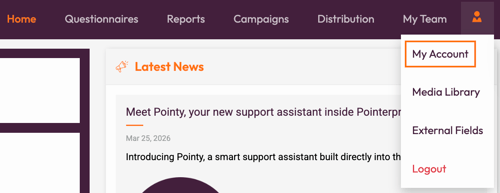
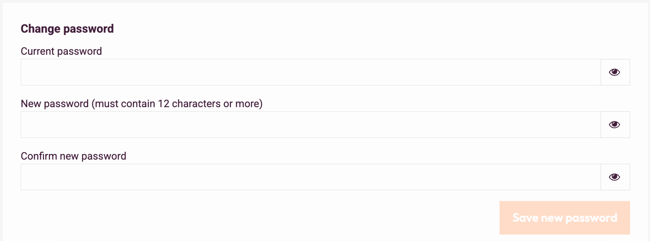
In the Personal Info section go to Change password section.
Enter your Current password and then your New password, enter it again to confirm. Click Save new password when you're done.
NOTE
New password must contain at least 12 characters, one capital letter and one number.
Remember to log in next time with your new password!
What's next?
- View your invoices: Here is where you can find your recent invoices listed, with a download icon at the end of the row where you can download individual invoices. If you're looking to see an older one, you can just select the View all invoices button.
- Team management: With this feature, you can manage what the different team members have access to. You can set up who is allowed to edit the questionnaire or who you only want to give viewing rights to. You could also allow team members to view the reporting dashboard.
- White labeling: You can remove Pointerpro brand and logo from our product and replace it with your own. There are a lot of possibilities for branding your questionnaire by design. But if you want to fully brand your questionnaire by using your own link, you can white-label your questionnaire.
Don't want to build it yourself? Contact our professional services team