
Once you've set up your questionnaire structure, you're ready to add questions. This guide covers adding your first question, adding questions quickly as you build, and cleaning up when you need to remove one or several questions.
You'll need this:
- One of these Pointerpro plans:
 Professional Enterprise ReportR DistributR
On this page:
2. Duplicate or delete a single question
3. Delete multiple questions at once
Step 1: Add your first question
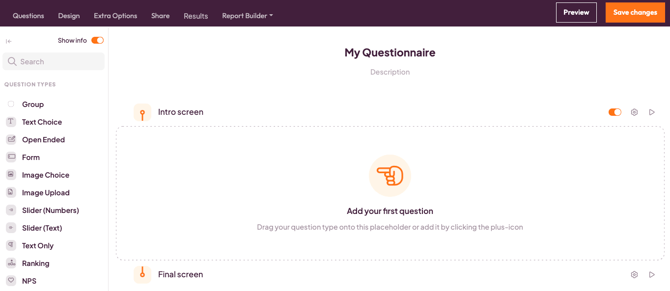
A brand-new, empty questionnaire shows a prompt guiding you to add your first question. Click it to get started. Adding a question opens its own dedicated page, so you can set it up without distractions.
Step 2: Duplicate or delete a single question
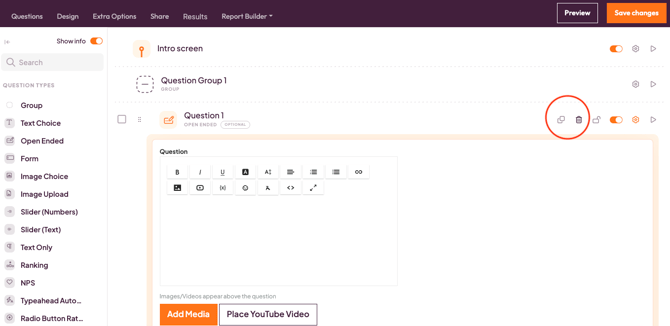
Every question has its own actions menu. Open it to duplicate that question or delete it.
Step 3: Delete multiple questions at once
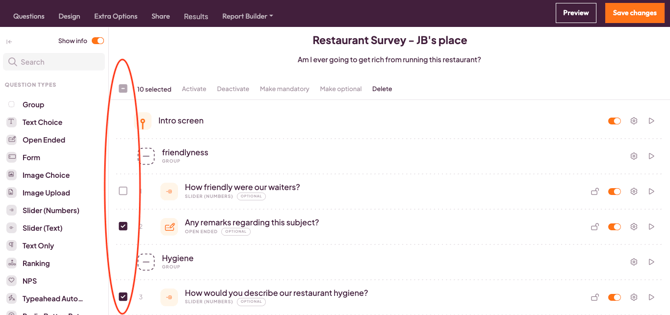
If you're restructuring a larger questionnaire, you can select several questions and delete them all in one go, instead of removing them one by one.
Tip: Take a moment to review your selection before confirming the deletion.
What's next?
- How to organize your questionnaire with blocks — group related questions together as your questionnaire grows.
- How to reorder questions and question blocks — move questions and blocks around with drag and drop.
- Sidebar and navigation in Pointerpro (Questionnaire Builder) — get familiar with the rest of the builder's interface.