
You'll need this:
-
One of these Pointerpro plans:
 Professional
  Enterprise ReportR DistributR
Dashboard Builder is an extra feature with an additional fee.
Please contact sales@pointerpro.com.
On this help guide page:
When you open your dashboard and Enter edit mode, click on the + Add item button and scroll to Gauges section:
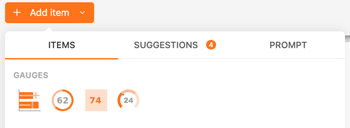
1. Bullet chart
A bullet chart is a variation of a bar chart designed to display progress toward a goal, comparing actual performance to target performance.
Use cases:
- Visualizing performance against goals
- Monitoring progress over time
- Comparing actual results to benchmarks
Common data to use in an assessment:
- Performance metrics
- Achievement of assessment targets
- Progress against development goals
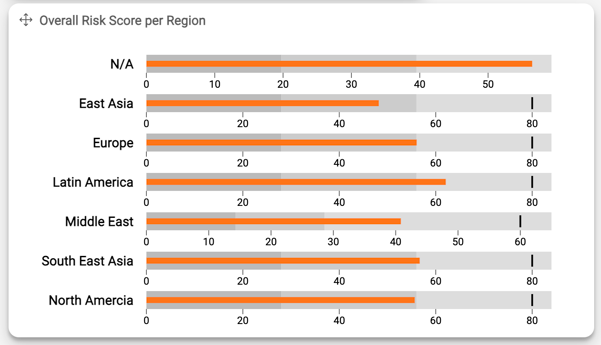
You can set the goal for each category/bar to show the performance metrics. In below graph, the goal is 80 for all regions, except for Middle East where the goal is set to 60.
2. Circular gauge
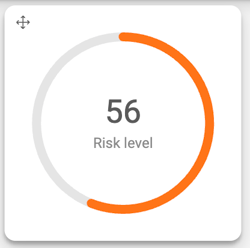
A circular gauge, or radial gauge, is a circular graph with an indicator needle that points to a value on a radial scale, often used to show progress or performance levels.
Use cases:
- Displaying single-value metrics
- Visualizing performance levels
- Showing progress toward a target
Common data to use in an assessment:
- Assessment scores
- Progress towards goals
- Performance levels
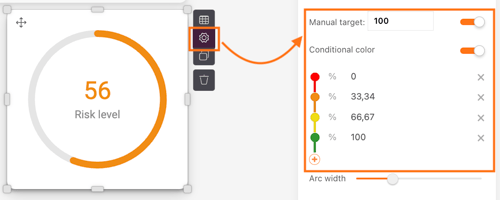
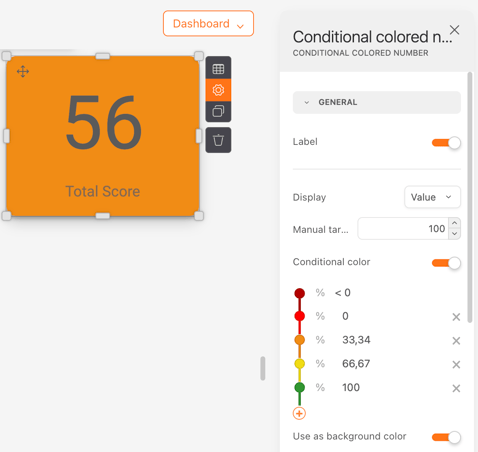
You can also set Manual target and Conditional colors based on the metrics for better visualization. As such, the chart color will change depending on the metric value compared to the target.
3. Conditional colored number
A conditional colored number chart displays a number with a color that changes based on predefined conditions, providing quick visual cues about the data’s status.
Use cases:
- Highlighting critical metrics
- Visualizing status at a glance
- Indicating performance levels
Common data to use in an assessment:
- Key performance indicators (KPIs)
- Assessment scores
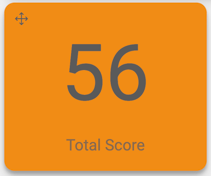
Same as above, you can configure the Conditional color in the chart settings.
4. Speedometer
A speedometer chart, or dial gauge, resembles a car speedometer, showing a needle pointing to a value within a range, often used to represent performance levels.
Use cases:
- Displaying performance levels
- Monitoring progress towards goals
Common data to use in an assessment:
- Performance metrics
- Assessment scores
- Progress towards targets
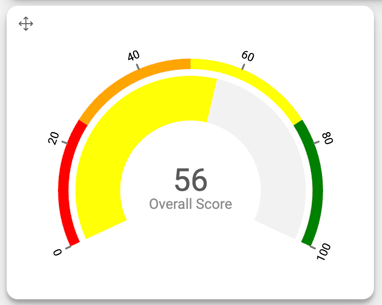
On the speedometer you can also set Conditional color. The main difference here is that you can see the different levels and colors in an overview and compare the current metric value to the thresholds.
What's next?
- Dashboard Builder: datasets explained: Check detailed explanations on the datasets available for your to connect to your
- Getting started with the basic widgets on your dashboard: Widget items: general.
- Check out these widgets to turn your dashboard data into meaningful insights:
Don't want to build it yourself? Contact our professional services team