
The Questionnaire Builder lets you reorder questions and blocks with drag and drop, so restructuring a questionnaire doesn't mean rebuilding it. This guide covers every way to move things around.
All Pointerpro plans apply.
On this page:
1. Move a question within a block
2. Move a question to a different block
4. Add a question type directly into a block
Step 1: Move a question within a block
Click and drag a question up or down within its block to change its position.
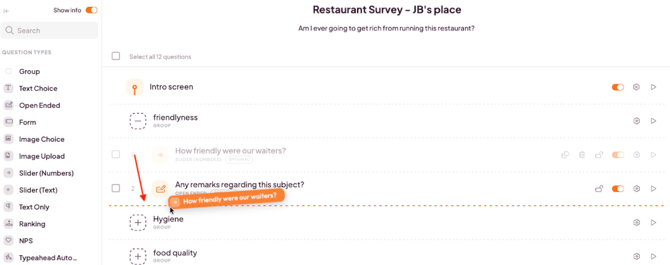
Step 2: Move a question to a different block
Drag a question out of its current block and drop it into another block. This moves the question, you don't need to delete and recreate it.
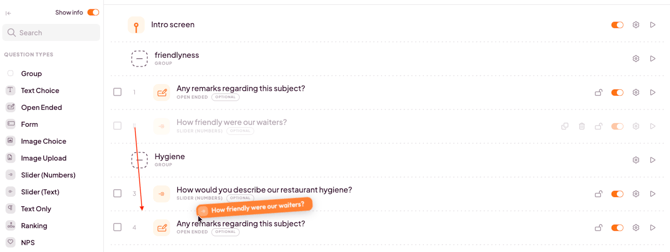
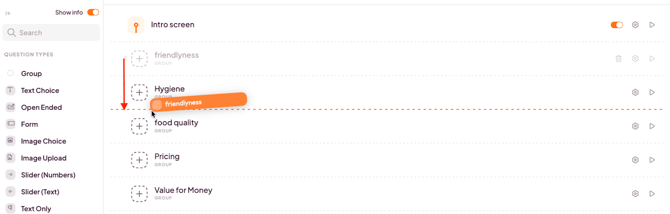
Step 3: Reorder entire blocks
Drag a block by its header to move it relative to your other blocks. Everything inside the block — all its questions — moves together in one action.
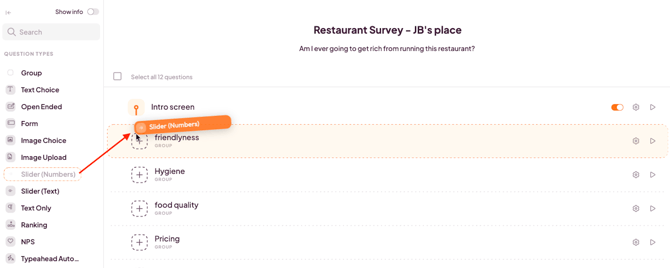
Step 4: Add a question type directly into a block
Instead of adding a question and then choosing its type, you can drag a question type straight from the sidebar and drop it into the block where you want it.
Note: If a question is part of your skip logic, you'll see a warning before a reorder would break that logic. This gives you the chance to adjust your logic first, instead of finding this out after the facts.
What's next?
- How to organize your questionnaire with blocks — create and manage blocks in the first place.
- How to add and manage questions in the new Questionnaire Builder — add, duplicate, and delete questions.
- Sidebar and navigation in Pointerpro (Questionnaire Builder) — get familiar with the rest of the builder's interface.