---
title: Question Block Custom Score Table
description: Question Block Custom Score Table shows your respondents how they scored based on the Question Blocks you have created. Test drive it for free today👉
---
[Skip to content](https://help.pointerpro.com/question-block-custom-score-table#main-content)
[](https://pointerpro.com/)
- [Getting started](https://help.pointerpro.com/how-to-get-started-with-pointerpro)
- [Pricing](https://pointerpro.com/pricing)
- [Customer stories](https://pointerpro.com/case-studies)
Open main navigation
Close main navigation
- [Getting started](https://help.pointerpro.com/how-to-get-started-with-pointerpro)
- [Pricing](https://pointerpro.com/pricing)
- [Customer stories](https://pointerpro.com/case-studies)
- [New here? Explore what Pointerpro can do](https://www.pointerpro.com/)
[New here? Explore what Pointerpro can do](https://www.pointerpro.com/)
How can we help you?
- There are no suggestions because the search field is empty.
1. [Knowledge Base](https://help.pointerpro.com/?hsLang=en)
2. [Extra Options](https://help.pointerpro.com/extra-options?hsLang=en)
3. [Custom scoring](https://help.pointerpro.com/extra-options?hsLang=en#custom-scoring)
# Question Block Custom Score Table
Question Block Custom Score Table shows your respondents how they scored in an assessment based on the [Question Blocks](https://help.pointerpro.com/migration/knowledge/question-grouping-question-blocks?hsLang=en) you have created. It is a way to show your respondents in which areas they excel and which areas need improvement.
##### You'll need this:
- One of these Pointerpro plans:
 Professional  Enterprise  ReportR  DistributR
---
##### On this help guide page:
1. [Create question groups](https://help.pointerpro.com/question-block-custom-score-table#create)
2. [Activate custom scoring](https://help.pointerpro.com/question-block-custom-score-table#activate)
3. [Adjust the final screen](https://help.pointerpro.com/question-block-custom-score-table#adjust)
---
#### 1. Create question groups
During the creation of your assessment, put the questions in the relevant question groups.
#### 2. Activate custom scoring
Next, toggle on[ custom scoring](https://help.pointerpro.com/migration/knowledge/question-types-that-support-custom-scoring?hsLang=en), which you'll find also at Extra Options tab.
Now it's time to go back to the Questions tab and assign a value to each answer. Simply use the arrows that now appear next to the answer.
#### 3. Adjust the final screen
Now Scroll down until you'll find the text for the final screen. Adjust the text and simply choose one of the following options from the drop-down list of Variables - either Question block custom score ranking table or Question block custom score as percentage ranking table.
The first option will show the actual score for each group, sorted from high to low, or choose the second option if you want result displayed as a percentage.
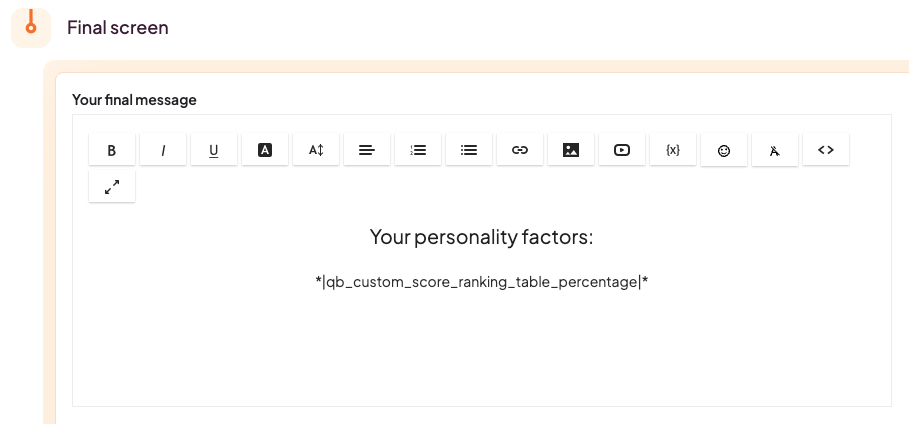
You can add some text to your final message or an additional text box.
Don't forget to **save changes,** and you're good to go! Here is how it looks:

#### What's next?
- [Outcomes ](https://help.pointerpro.com/migration/knowledge/outcomes?hsLang=en)is a feature that allows you to select what you will show to your respondents as a final screen, based on their answers to all inquiries or show a screen based on criteria that you have specified, such as a specific quiz score. This feature offers the possibility to create personality quizzes and business tests that end with personalized advice.
- The [final screen](https://help.pointerpro.com/migration/knowledge/final-screen?hsLang=en) aims to give a final message to your respondents, thank them for participating, give further instructions or leave some extra information. This the also the page where you can add your [social media icons](https://help.pointerpro.com/migration/knowledge/social-media?hsLang=en) to enable your respondents to like or share your survey, your Facebook page or website.
- [Formulas ](https://help.pointerpro.com/migration/knowledge/formulas?hsLang=en)is a great feature that allows you to calculate an average, custom score, average results and any advanced calculations, using the data and items from your survey. You can use the /\*-+() characteristics to create formulas that use variables like answers or quiz scores to calculate an average, for example.
- [Getting Started](https://help.pointerpro.com/getting-started?hsLang=en#main-content)
- [Getting Started](https://help.pointerpro.com/getting-started?hsLang=en#getting-started)
- [How To Guides](https://help.pointerpro.com/getting-started?hsLang=en#how-to-guides)
- [Glossary](https://help.pointerpro.com/getting-started?hsLang=en#glossary)
- [Build & Design](https://help.pointerpro.com/build-design?hsLang=en#main-content)
- [Intro Screen & Final Screen](https://help.pointerpro.com/build-design?hsLang=en#intro-screen-final-screen)
- [Question Types](https://help.pointerpro.com/build-design?hsLang=en#question-types)
- [Media & Variables](https://help.pointerpro.com/build-design?hsLang=en#media-variables)
- [Design your survey](https://help.pointerpro.com/build-design?hsLang=en#design-your-survey)
- [Campaigns](https://help.pointerpro.com/build-design?hsLang=en#campaigns)
- [FAQ](https://help.pointerpro.com/build-design?hsLang=en#faq)
- [Extra Options](https://help.pointerpro.com/extra-options?hsLang=en#main-content)
- [Text options](https://help.pointerpro.com/extra-options?hsLang=en#text-options)
- [Question logic](https://help.pointerpro.com/extra-options?hsLang=en#question-logic)
- [Custom scoring](https://help.pointerpro.com/extra-options?hsLang=en#custom-scoring)
- [Quiz Options](https://help.pointerpro.com/extra-options?hsLang=en#quiz-options)
- [Kiosk mode options](https://help.pointerpro.com/extra-options?hsLang=en#kiosk-mode-options)
- [Data collection options](https://help.pointerpro.com/extra-options?hsLang=en#data-collection-options)
- [Other options](https://help.pointerpro.com/extra-options?hsLang=en#other-options)
- [Integrations & API](https://help.pointerpro.com/extra-options?hsLang=en#integrations-api)
- [FAQ](https://help.pointerpro.com/extra-options?hsLang=en#faq)
- [Share & Results](https://help.pointerpro.com/share-results?hsLang=en#main-content)
- [Sharing your questionnaire](https://help.pointerpro.com/share-results?hsLang=en#sharing-your-questionnaire)
- [View Results](https://help.pointerpro.com/share-results?hsLang=en#view-results)
- [Results Dashboard](https://help.pointerpro.com/share-results?hsLang=en#results-dashboard)
- [Uploading and Downloading Results](https://help.pointerpro.com/share-results?hsLang=en#uploading-and-downloading-results)
- [FAQ](https://help.pointerpro.com/share-results?hsLang=en#faq)
- [Report Builder](https://help.pointerpro.com/report-builder?hsLang=en#main-content)
- [General](https://help.pointerpro.com/report-builder?hsLang=en#general)
- [Widgets](https://help.pointerpro.com/report-builder?hsLang=en#widgets)
- [Aggregate Reports](https://help.pointerpro.com/report-builder?hsLang=en#aggregate-reports)
- [FAQ](https://help.pointerpro.com/report-builder?hsLang=en#faq)
- [Legacy Report Builder \[deprecated\]](https://help.pointerpro.com/report-builder?hsLang=en#legacy-report-builder-deprecated)
- [Dashboard Builder](https://help.pointerpro.com/dashboard-builder?hsLang=en#main-content)
- [General](https://help.pointerpro.com/dashboard-builder?hsLang=en#general)
- [Widgets items](https://help.pointerpro.com/dashboard-builder?hsLang=en#widgets-items)
- [Distribution Portal](https://help.pointerpro.com/distribution-portal?hsLang=en#main-content)
- [Configuration](https://help.pointerpro.com/distribution-portal?hsLang=en#configuration)
- [Management & Administration](https://help.pointerpro.com/management-administration?hsLang=en#main-content)
- [Account & Billing](https://help.pointerpro.com/management-administration?hsLang=en#account-billing)
- [GDPR compliance](https://help.pointerpro.com/management-administration?hsLang=en#gdpr-compliance)
- [FAQ](https://help.pointerpro.com/management-administration?hsLang=en#faq)
[](http://pointerpro.com)
Can't find what you're looking for? Contact us at [support@pointerpro.com](mailto:support@pointerpro.com)
Copyright © 2026, Pointerpro